Method importing into motion builder and exporting into maya.
Maya intimating time.
This has been my best friend for this, as frame by frame tweeking would just be a horrible way to go!
But the graph editor lets me see what the joints doing and where it's screwing up, also works in the same way tweening works in flash. Working on curved to make everything smoother.
This scene had to be split up into 2 'takes' as when it came to running, there was not enough room in the studio.
So we have the running.
And the piggy back ride.
And spliced together!
Tetra climbing a tree. The mo cap data used the actor getting on a table, so I had to warp it so she was sitting on a wonkier surface
I think what I learnt from 3rd year, is that I absolutely ADORE. Seeing my models in the real world. They are also the best way to show my skills to people who don't really understand modeling.
People have asked me I really do with the MA, and they were parents, that didn't know a thing about gaming or the 3D programs. But as soon as I showed them photos of my figurines they instantly got it.
I also want something to do with the animation, considering animation is not my strong suit and wanted something that actually shows the part of modeling I'm more passionate about.
I also thorough it would be pretty cool try and and get my characters personality across is a single pose.
Coats print out
With Coats, he is very into fashion and clothes, and also NEEDED something large to hold up his slim legs and arms, he needed all 4 to be supported otherwise he wouldn't be able to hold himself.
So I ended up thinking of him being scared, as he is a lover not a fighter!
He is a coward at heart, and the best way to show that is for hi to be startled by something small, like a mouse.
Clothes crease refs.
It's to easy to do to many creases in Zbrush, it's so easy to do.
Zbrush render
Never tried rendering in this, but it's faster than maya.
Tetra print out
Tetra was very hard to come up with a pose, as I worry her arm and legs are to slim to support her body. But in the animation she expresses a lot of interest in the tree. So I figured this would be a good base for her print.
I figured I'd rather go with a safer what would print well, over a sassier pose that might break.
Chris print out
Chris is not done yet. As Coats and Tetra I tried to have done before I was unable to print in uni.
As last year I couldn't print anything after may 25th. But know I learnt that the machine on campus is broken, and won't be repaired for at least a year, if they're even going to fix it. So I will have to look else where.
But Chris' pose is probably the easiest, as he is less energetic and twitchy than the other two. He's more of the ''thuggish'' character, more negative so I had him just leaning against a big with a no smoking sign on. Because he is such a rebel, underage drinking in the streets in the animation.
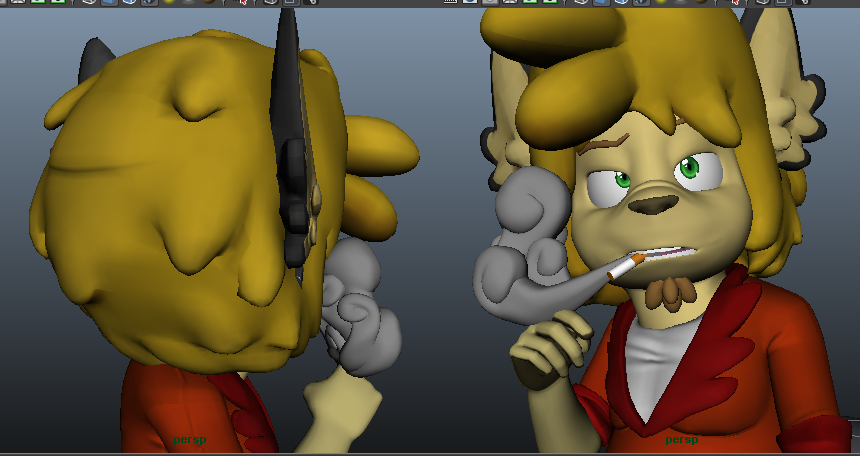
For thsi model it's going to me the SMOKE that will be the tough part. As I have to make that thick enough so it can be printed, and also not to frail, so up against his head and coiled around his hand.
I have used the blend shaped I already had for him, to make the desires face base to tweek.
And also used the tree I made a while back for the smoke base, as that has a spiral shape that took so long to create.
The smoke was something that didn't feel as stylized. Nor did it look like it was coming from his mouth.
So I came up with a few options.
So a friend sketched this as an idea, which I wanted to try and replicate.
Which I had done, and liked it. So this is now what the smoke looks like.
But now I am aware the machine is broken in uni.
I am opting to use websites like:
http://callprint3d.co.uk/software.php
http://callprint3d.co.uk/
US site: http://www.shapeways.com/
Currently I trust the US site as I know people who have used it. And also the seem to print things quite quickly. Compared to what I thought. 1-3 weeks for printing coloured models. and another few weeks for delivery.
He had asked me to make a story board to print out. I had to separate the animation into 'takes' short segments of animation, so it can be easily exported and imported while editing. So I basically took the animation and made it into the story board.
That I then printed out 2 and brought to the A meeting i had with the drama tutor Darren.
Now having the story board, I gave him a copy and we figured out when was a good day to have a session and what hours.
We figured we only needed to have 2 since there weren't as many takes as planned.
So we had a session on 2nd April. And we managed to get ALL of the takes done in the 6 hour session we had.
Durig the session we manage to get my characeters on the screen to go live with the actors.
At first, we only managed to get one model in at a time.
So during th elunch break I had to sort it out, and figure out a way to import more than one character at a time. I eventually suceesed.
What we were doing:
1. Had the 2 actors skeletons in a scene
2. File> Merge file> Import Coat's file.
3. File> Merge file> Import Tetra's file.
This method cause problems, the models would just combine with each other their meshes would be stuck together. and only one skeleton and mesh would be able to reall ymove.
I figured out dragging and dropping the files in from the asset browser fixed this problem.. So we were able to have all 3 characters move around in the same file.
We also figured out a much quicker way to capture the data.
In the studio there are 2 computers. in this area.
One computer with a monitor that is connected to a second, larger monitor on the wall.
Then next to this set up is another laptop, this laptop is optional, and is where I load my models into.
And usually, they just use this first larger computer, with the program that ONLY captured the motion capture data. It does NOT capture it with the models.
Only using this single computer takes a while to save, plot to a skeleton and export captured data.
Whereas, if you use the laptop to capture the data instead. It basically captures it as it is happening. Their's no time wasted to plot and figure out the data. Which can take form 5 - 20 minutes)
As the laptop is using motion builder. Which has a record function in it.
This is how we managed to get 21 takes done in a day. As we had to redo some of them due to the actors doing to far off screen and not captured half way through.
The parts I tend to dread when it comes to creating scenes. Characters I'm fine with designing and creating! But environments...a little big harder!
Time to Mood board! To fit with my cartoon characters I'm going to take inspiration from games such as Crash Bandicoot, Sly Cooper and Jak and Daxter.
My favorite from the board, which has the feel I want is the bottom image, I adore how that grass and tree looks, the soft colours.
And when it comes to building designs (Which is the background for majority of the animation) I looked at more colourful buildings.
And it seems to be the best way to have the colour, but not be to much on the eyes to take attentoin away, is to have the colour be on the wooden boards around windows and doors.
I also don't want this to look like a large town, a small town where very few people are out. A place where a teenager can casually drink alcohol on a side road.
This sort of area was where I once lives as a kid, it was a VERY small town. And looking back at it it's perfect, it has that colour and interesting, but not to much to distract.
And I found one specific side road that is very much what I want, it's away from the main road and also has a field with one single thick tree in it. Almost like it was meant to be.
So it was time to design the terraced houses. It was mostly about designing the shapes of the window and door boarders. Taking shapes from the mood board and from this street.
Now I have house front designs, huraahh. I have 3 variations so the street won't look as samey.
And now that beautiful tree. I actually like designing trees, I love trees with swirls on them.
The branches are also a big deal to, as one of them is going to be sat/kneel'ed on by Tetra. While the other is to be grabbed and swung on by Coats.
So I liked the rounded bushy one with 2 branches that are flat-ish.
And the scaled of the tree compared to Tetra and Coats.
Time to model things!
It was nice to not worry about making models that had to be lower poly to fit into a game engine.
The tree took the most effort, and most time consuming to make, as I wanted the textures to be flat colour, and look soft and simple in the render. So I decided to model the swirls in the tree.
But they came out pretty nice with even just a simple render using mental ray. With some image based lighting.
This bin was done to be part of a 3D print with Chris, an idea i had. But this bin also fit into the scene, something to be in the background behind the fence in the tree's scene.